Last month I wrote about the people a web form turns away. This post is about the people it accepts. They fill it in, press send and see a thank-you message. Then the enquiry lands in a junk folder, in a quarantine queue nobody opens, or nowhere at all. Nobody is told. The customer thinks you ignored them, and you never knew they asked. The usual cause is not the form. It is three short records in your domain settings that most businesses have never looked at, plus one habit in the way a lot of forms are built.
- The thank-you page is not a receipt
- What changed: mailbox providers stopped taking email on trust
- SPF, DKIM and DMARC in plain English
- The form that pretends to be your customer
- The website that pretends to be you
- DMARC: watch first, then enforce
- Fifteen minutes: check your own
- Save the enquiry, not just the email
- What we are not claiming
- Our position
The thank-you page is not a receipt
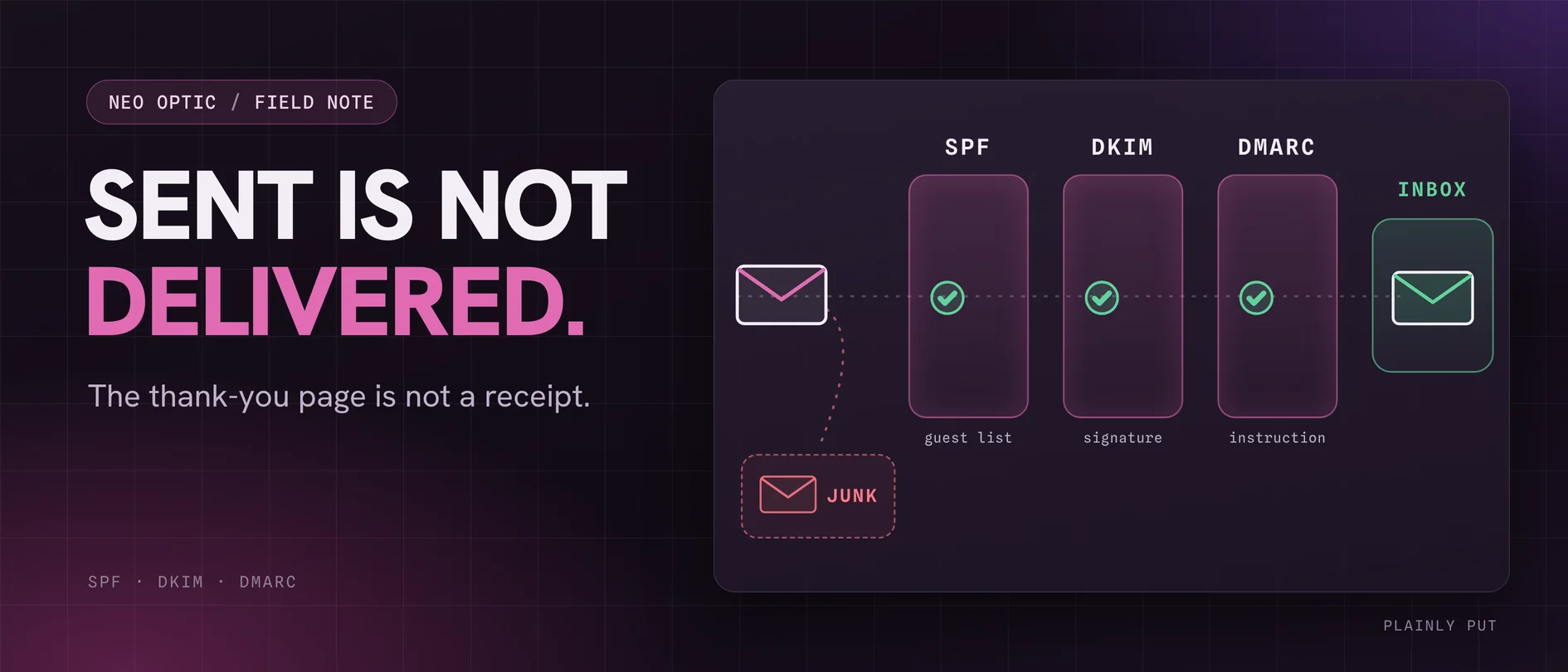
When a contact form says your message has been sent, it means something narrower than it sounds. The website handed an email to a sending server, and that server accepted it. The website's knowledge ends there. Whether the receiving mail system then put it in the inbox, filed it as junk, held it in quarantine or refused it outright all happens somewhere the form cannot see.
We relearn this on our own platform. Every enquiry there records whether its email notification was sent, and we keep coming back to the same point: sent only means the next server accepted it. It tells you nothing about the inbox.
So a form can pass every test its builder ran and still lose enquiries. And because the loss happens after the thank-you page, each side assumes the other has gone quiet. The customer does not ring to ask why you never replied. They ring somebody else.
A form that says “sent” has only proved the email left your website. Whether it reaches a person depends on your domain's email records and on how the form addresses the message. You can check both in a few minutes.
What changed: mailbox providers stopped taking email on trust
For years, badly configured email mostly arrived anyway. Not any more. In February 2024 Google introduced requirements for everyone sending to personal Gmail accounts. Google's sender guidelines say all senders must set up SPF or DKIM. Anyone sending more than 5,000 messages a day must have SPF, DKIM and DMARC, with the visible From address aligned to one of them. Yahoo introduced matching rules at the same time. Microsoft followed in May 2025 with its own rules for high-volume senders to Outlook.com, Hotmail and Live addresses.
A small business sending a dozen enquiry notifications a day is nowhere near 5,000. But the direction is the point. Those rules describe the same checks every serious spam filter runs, including the filters protecting your own Microsoft 365 or Google Workspace inbox. Whatever the volume, a message that cannot prove where it came from is exactly what those filters are built to distrust.
SPF, DKIM and DMARC in plain English
These are three short text records published in your domain's DNS. DNS holds the same settings that point your domain at your website and your email, and it is managed wherever your domain is registered or hosted. You do not need to read the syntax to understand what the records do.
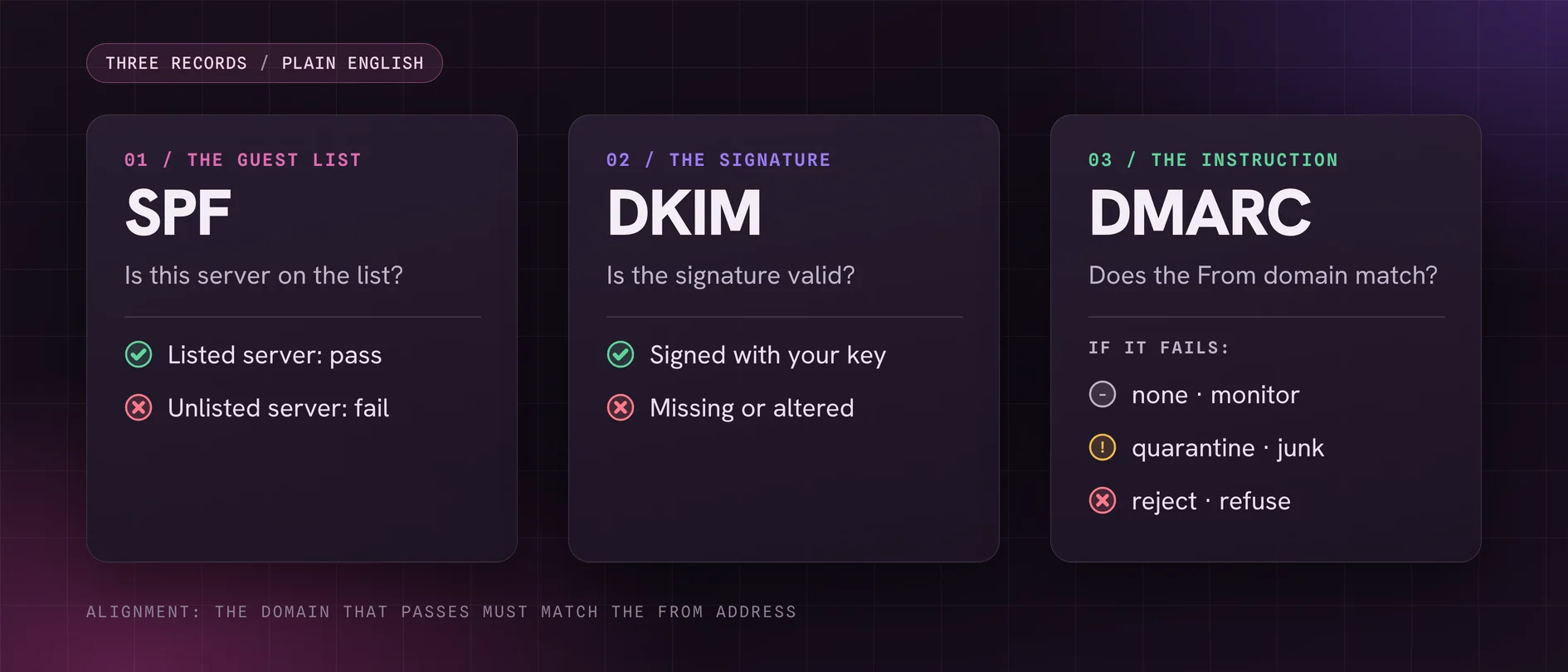
- SPF is the guest list. It names the servers allowed to send email for your domain: your email provider, your newsletter tool, the service your website uses. A message from a server that is not on the list fails.
- DKIM is the signature. The sending service signs each message with a private key and publishes the matching public key in your DNS. A receiver can check the signature, which tells it the message came from someone holding your key and was not altered on the way.
- DMARC is your instruction. It tells receivers what to do with a message that claims to be from your domain but fails both checks: let it through anyway, treat it as suspicious, or refuse it. It also tells them where to send reports about what they saw.
One more word is worth knowing: alignment. Passing SPF or DKIM is not enough on its own. The domain that passed has to match the domain in the From address the reader sees. A message can pass SPF for your web host's domain and still fail DMARC for yours. That one detail explains a surprising number of missing enquiries.
The form that pretends to be your customer
Here is the habit. A visitor fills in the form with their name and email address. To make replying easy, the form sends the notification as if it came from the visitor, with their address in the From line, so you can press reply and it goes straight to them.
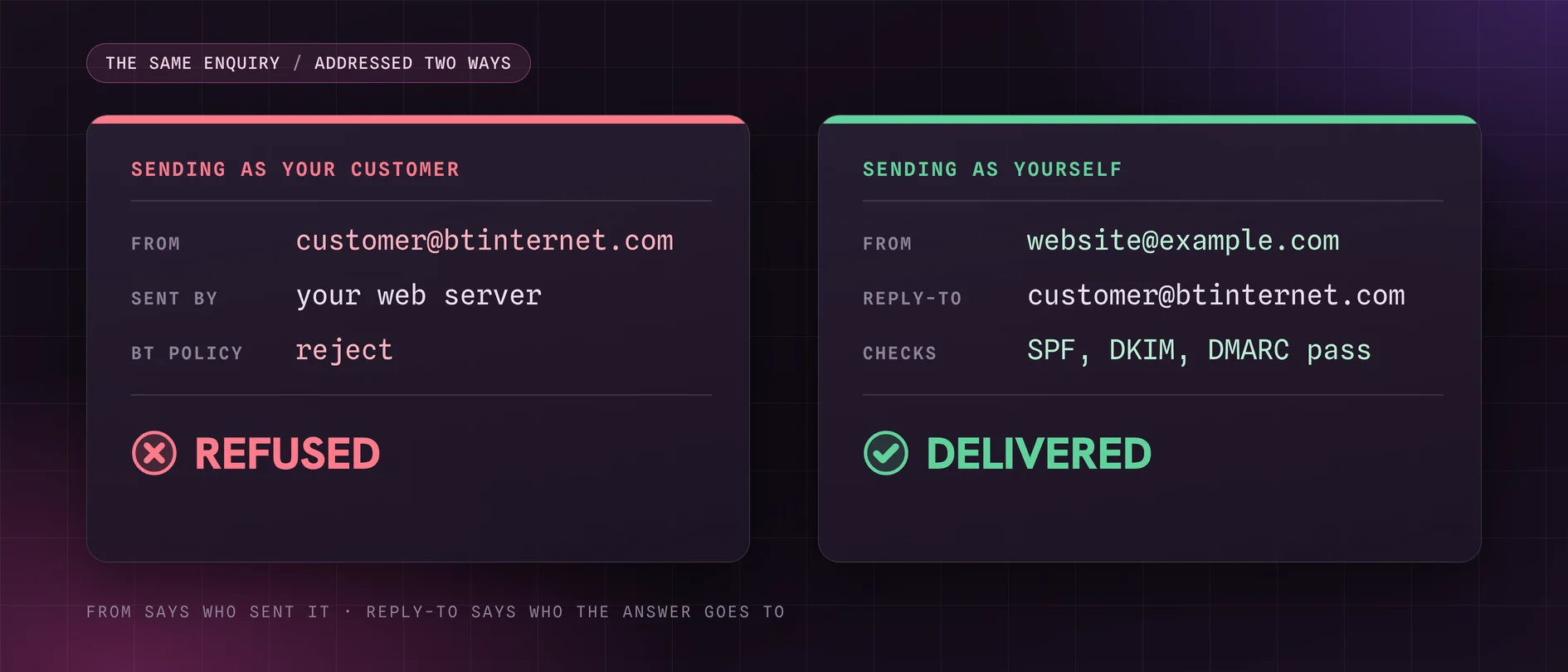
It feels helpful. To every mail system on the way, though, it is your web server claiming to be somebody else's email provider. Say the visitor has a BT address. The message says it is from btinternet.com, but it was sent by your website's server, which BT never authorised. BT's DMARC record tells receivers what to do with that.
On the day this post was written, we looked up the published DMARC policies of some addresses UK customers commonly use:
- btinternet.com, sky.com, yahoo.com and aol.com: reject. Refuse messages that fail.
- icloud.com: quarantine. Treat them as suspicious, which usually means junk.
- gmail.com and hotmail.com: none, for now. Monitor only, although gmail.com already asks for quarantine on its subdomains.
So a form built this way can lose every enquiry from a BT or Sky customer outright and send Apple customers to junk, while appearing to work perfectly when the owner tests it with their own Gmail address. Any of those policies can change, and so far the direction of travel has been one way. Google's guidelines already warn senders not to impersonate Gmail From addresses and say Gmail plans to use quarantine enforcement.
The fix is small and well established. The notification should come from an address on your own domain, sent through a service your domain has authorised, with the visitor's address in the Reply-To field. Pressing reply still reaches the customer, and nothing is pretending to be anybody. That is how the form on this website works.
The From line says who sent the message. The Reply-To line says who the answer goes to. A contact form needs both, and they are not the same person.
The website that pretends to be you
The second pattern is the mirror image. The form sends the enquiry from an address on your own domain to an address on your own domain, which looks safe, but it goes out through the web hosting server instead of through your email provider. Unless that server is in your SPF record and the message carries a DKIM signature for your domain, your own mail system sees a message claiming to be from you, sent from a machine you never authorised. That is what impersonation looks like, and a good filter treats it accordingly.
The same failure can creep in quietly when something changes around the website:
- You move email provider and the new SPF record replaces the old one, dropping the service the website sends through.
- Someone adds a newsletter or booking tool and creates a second SPF record instead of editing the first. The standard is explicit that more than one SPF record is an error, so the check fails for everything.
- The SPF record grows past ten DNS lookups as services are added. The same standard caps evaluation at ten, and past that the result is an error, not a pass.
- DKIM was never switched on for your own domain. Microsoft's documentation is clear that in Microsoft 365, DKIM signing for a custom domain has to be set up: you publish the records and enable it. Google Workspace has its own equivalent step.
None of these shows up on the website. The form still says thank you.
DMARC: watch first, then enforce
With no DMARC record at all, receivers make their own decisions about failing mail, and you get no reports. Publishing a record with a policy of none is a sensible first step. Nothing is blocked, but receivers start sending summary reports of every server sending as your domain. Those reports surface the forgotten senders: the website, the booking system, the old accounts package that emails invoices.
The step people miss is reading them. A DMARC record set to none, with reports going to a mailbox nobody opens, is monitoring in name only. The reports are machine-readable files, not letters, so most businesses use a report service, free or paid, to turn them into something a person can read.
Once every legitimate sender passes, move the policy to quarantine and then to reject. This is where DMARC stops being only a delivery setting and becomes a security one. At reject, receivers that honour it will refuse email that claims to come from your exact domain and cannot prove it. That is precisely the email a criminal sends when they pretend to be you, with new bank details on an invoice.
Do it in stages. If you move straight to reject while the website is still unauthenticated, you will block your own enquiries more thoroughly than any spam filter would.
Fifteen minutes: check your own
You do not need to change anything to do this. Do not edit DNS records yourself unless you know exactly what you are doing: a broken SPF record can stop all of your email, not just the website's. For now you are only collecting facts.
- Send yourself an enquiry from your website using a Gmail address as the customer. Repeat it with an Outlook or Hotmail address, and with a BT or Sky address if you or a colleague has one. Did each one arrive, and did it land in the inbox or in junk?
- Open one that arrived and look at From and Reply-To. From should be an address on your own domain, and the customer's address should be in Reply-To. If the customer's address is in From, you have found the first problem above.
- Look at the authentication results. In Gmail, open the message, choose the three-dot menu, then Show original. Near the top it lists SPF, DKIM and DMARC as PASS or FAIL, with the domain each was checked against. In Outlook, the message source shows the same results in a line headed Authentication-Results.
- Look up your records. A free tool such as Google's Admin Toolbox Dig shows your domain's TXT records. Look for exactly one record beginning v=spf1, and for a DMARC record at _dmarc followed by your domain.
- Check junk and quarantine for website enquiries from the last month. In Microsoft 365, quarantined messages can sit in a separate quarantine area instead of the junk folder.
- Check the address the form sends to. Does that mailbox still exist, and does somebody read it? Forms tend to outlive the people they were set up for.
- Ask your web supplier three questions. Which service sends our form emails? Is it in our SPF record, and does it sign DKIM for our domain? Is each enquiry saved somewhere other than email?
If everything passes and lands in the inbox, good. If something fails, you have a specific question for whoever looks after your website or email, instead of a vague sense that enquiries have gone quiet.
Save the enquiry, not just the email
Even a perfectly authenticated email is a notification, not a record. Mailboxes fill up, filters change, people leave and sending services have outages. The safer design has the website save every submission first, in a database that is visible in the site's admin, and only then send the email as an alert that something has arrived.
That changes what a failure costs. If the email fails, the enquiry is still there, and you can see that the email did not go. We have had exactly this in testing on our own platform. A form saved its enquiries perfectly and sent nothing, because the address it was meant to send to had been left blank. The submissions were saved, so the cause was quick to find. Without them, the first sign would have been a phone that had gone quiet.
It is also worth checking what the visitor is told when only the email part fails. If the enquiry has been saved, they should see a thank-you, not an error. Showing an error for an enquiry you actually received just sends them somewhere else.
What we are not claiming
We are not claiming authentication guarantees the inbox. SPF, DKIM and DMARC prove where a message came from. Content, sending reputation and the recipient's own rules still decide where it lands.
We are not claiming every missing enquiry is a DNS problem. Forms break, mailboxes fill up and recipient addresses go stale. Authentication is one cause among several, which is why saving the enquiry matters as much as sending it.
We are not claiming DMARC stops all impersonation. It protects your exact domain. It does nothing about a lookalike domain registered with one letter changed.
We are not saying you are a bulk sender. The 5,000-a-day rules almost certainly do not apply to your enquiry form. The checks behind them apply to everybody.
The DMARC policies quoted above were correct on 9th October 2026. Any of those providers can change theirs, and you can look them up yourself in seconds.
And we are not going to put a number on what this costs you. Nobody can count enquiries that never arrived. That is rather the problem.
Our position
On client sites built on OliveCore, our own platform, an enquiry is saved before any email is sent, and each enquiry records whether its notification went. The notification is sent through an authenticated sending service, not straight off the web server. We would rather know that an email failed than assume it worked.
We treat a domain's email records as part of launching a website, not as somebody else's problem. The website is usually the first sender to be added to a domain and the first to be forgotten when the email moves.
If you have run the checks above and something failed, send us your domain name and what you found. We will tell you plainly what is wrong, who needs to fix it (your email provider, your web supplier or us) and how big a job it is. It is usually a few lines of DNS. The hard part is knowing to look.